
Best Shopify Bulk Lister Apps in 2026: Compared & Ranked
Most Shopify merchants hit the same wall at around 30–50 products: manually entering each listing becomes the bottleneck, not sourcing or shipping. A Shopify bulk lister - any tool that lets you create, import, or generate listings at scale - is the obvious fix, but the category covers wildly different things.
Shopify’s own CSV import, third-party importers like Matrixify, built-in AI like Shopify Magic, text-based description apps like Describely, and image-to-listing tools like Listagrow all get called “bulk listers” - but they solve different problems and require very different inputs. Picking the wrong one doesn’t just waste money; it wastes the time you were trying to save.
Here’s how the main options actually compare in 2026.
What to Look for in a Shopify Lister Tool
Before comparing options, get clear on what your workflow actually requires. A good shopify lister tool should handle:
- Bulk creation or import - can you process 50+ products in a single run?
- Content generation - does it write titles, descriptions, SEO fields, and tags, or do you pre-write everything?
- Image handling - can it process product images, not just ingest pre-written text?
- Direct Shopify sync - does it push listings directly to your store, or is everything a manual CSV re-import?
- SEO completeness - title, description, tags, SEO title, meta description, and image alt text are all required for a complete listing
- Data complexity - can it handle metafields, custom variant structures, and collections, or is it products-only?
- Pricing transparency - cost per listing should be clear and proportional to your catalogue size
Option 1: Shopify’s Native CSV Import
Best for: Migrating existing, pre-written product data from another platform
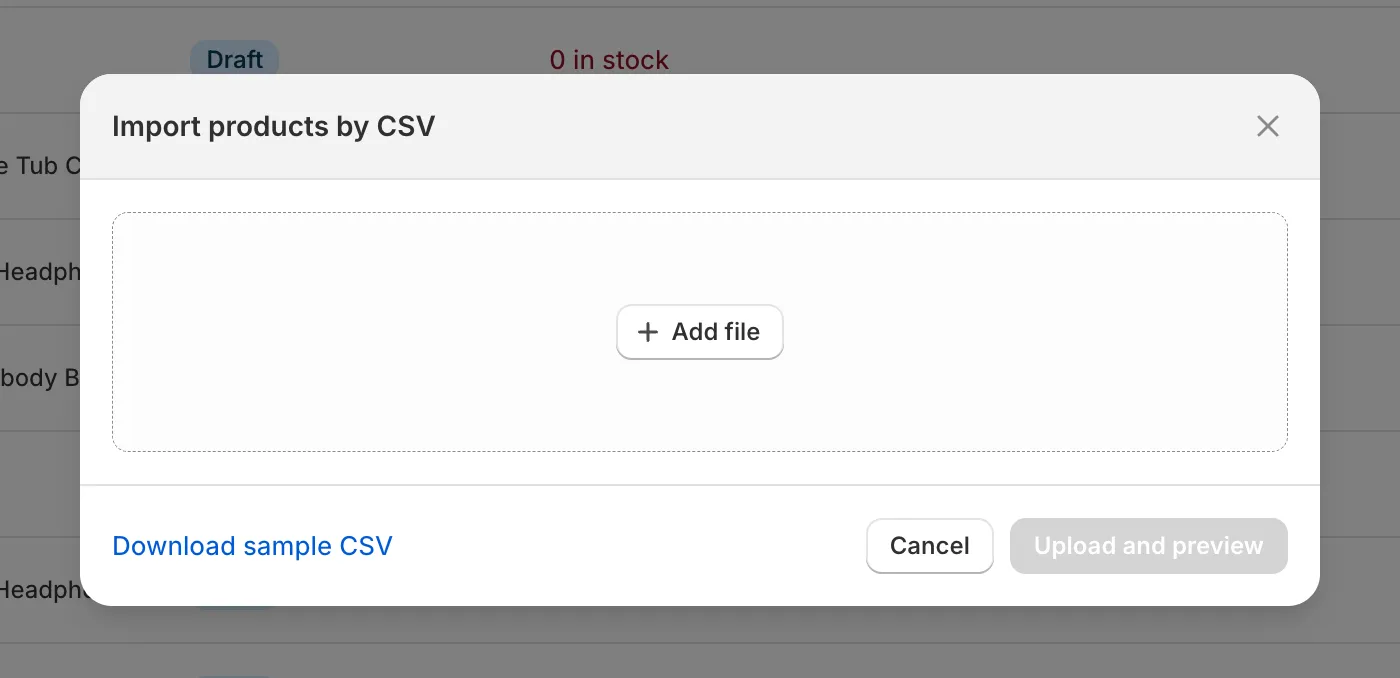
Shopify’s built-in CSV import is the baseline bulk lister for the platform. You structure a spreadsheet with all required fields - Handle, Title, Body HTML, Tags, SEO Title, SEO Description, Image Alt Text, Variant details - and Shopify ingests everything in one batch.
Strengths:
- Free and native to every Shopify plan
- Handles large volumes reliably once your CSV is correctly formatted
- Full control over every field
Weaknesses:
- Purely an importer, not a content creator - you still need to write every description, tag, and SEO field before you can use it
- Error-prone: Shopify flags and skips malformed rows rather than aborting the whole file, which makes debugging slow
- Zero content automation - every word must be written upfront
- Image alt text requires a separate row per image, all written by hand
- No support for complex variant structures, metafields, or collections without significant CSV preparation work
Verdict for bulk listing: If you have pre-written content and just need to move it into Shopify at scale, this works well. If you need to create that content - titles, descriptions, SEO fields, tags - it doesn’t help at all. It’s a logistics tool, not a content tool. For a full walkthrough of the import process, see our guide to bulk onboarding products into Shopify.
Option 2: Matrixify - Advanced CSV/Excel Importer
Best for: Merchants migrating large, complex catalogues from other platforms, or performing bulk edits on existing Shopify data
Matrixify (formerly Excelify) is the most powerful third-party importer on the Shopify App Store. Where Shopify’s native CSV import is rigid and limited, Matrixify handles the full breadth of Shopify data - products, variants, metafields, collections, customers, orders, redirects, and more - via Excel or CSV files it both exports and imports.
It’s particularly strong for migrations from WooCommerce, Magento, BigCommerce, or eBay, and for operations that Shopify’s native import physically can’t do: updating specific fields on existing products without overwriting others, managing metafields in bulk, or restructuring variant data mid-catalogue.
Strengths:
- Handles every Shopify object type, not just products
- Supports incremental updates - add or overwrite only specified fields without touching the rest of a listing
- Excel-native workflow with rich error reporting and a results file showing exactly what succeeded or failed
- Strong track record for large-scale platform migrations
- Free plan covers small imports; paid plans scale cleanly with volume
Weaknesses:
- Still a data-logistics tool, not a content generator - you need pre-written copy before you can import it
- The Excel template structure has a learning curve; non-technical merchants may find it complex on first use
- No image analysis or AI generation of any kind
Verdict for bulk listing: The best choice when you have complete product data that needs to move into Shopify reliably, especially for complex catalogues that break native CSV import. Not useful when the problem is creating the content rather than moving it.
Option 3: Shopify Magic (Built-In AI)
Best for: Merchants who want a quick AI-written description without installing anything
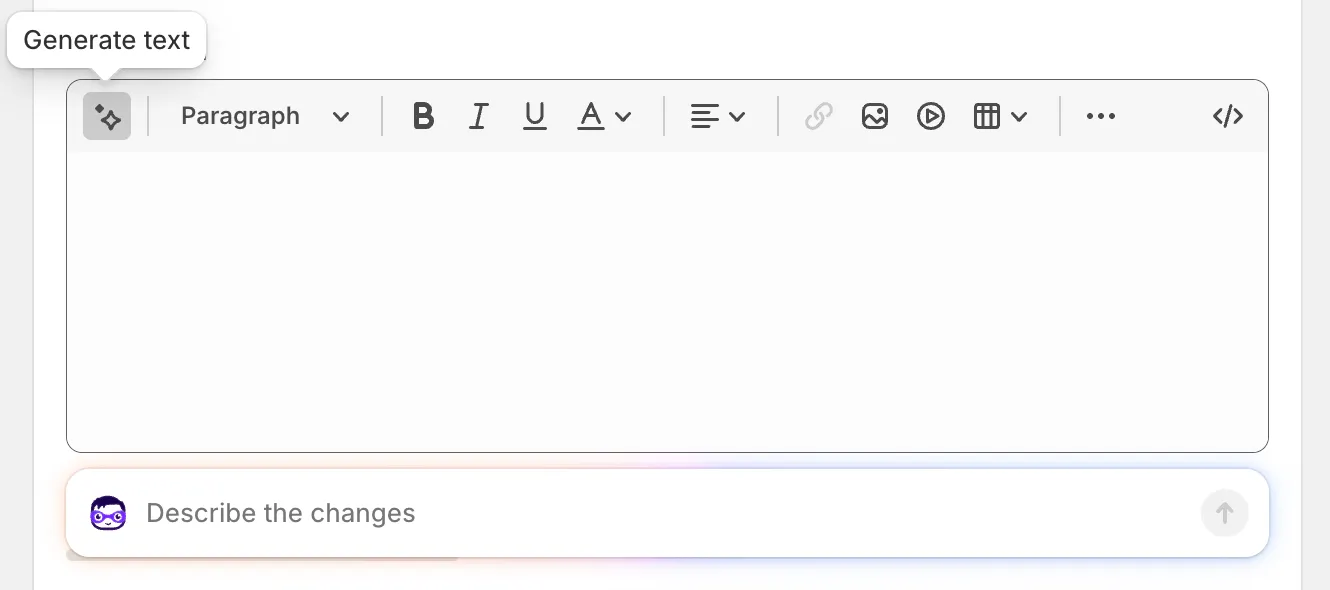
Shopify Magic is the built-in AI writing assistant available in every Shopify admin since 2023. You’re in the product editor, type a product title, optionally drop in a few keywords, and click the sparkle button - a first-draft description appears in seconds. Nothing to install, nothing to pay per use.
Strengths:
- Free and built into every Shopify admin - nothing to install or activate
- Produces a first-draft description in seconds from a product name and keywords
- Zero cost per use on any Shopify plan
Weaknesses:
- One product at a time only - no queue, no background processing, no batch mode
- Only generates the body description field; titles, tags, SEO title, meta description, and image alt text remain manual
- Quality degrades for visual, niche, or technically complex products where a name and a few keywords don’t capture the full picture
Verdict for bulk listing: Good for the occasional product you need listed quickly without installing anything. Don’t rely on it the moment you have more than a handful to create.
Option 4: Text-Input AI Description Apps
Best for: Stores with structured product data (spec sheets, supplier names, feature lists) who need descriptions generated at moderate scale
The most prominent third-party apps in this category are Describely and ShopiCraft. Describely is the most mature - it handles bulk title, description, and meta tag generation from product data you’ve already entered in Shopify. ShopiCraft targets smaller catalogues with a lighter interface.
The workflow is the same across all of them: you supply product names, features, and optionally a tone guide, and the AI produces text. The limitation is equally consistent - a product that arrives as a blank Shopify draft produces a blank or useless description. These tools amplify structured data; they don’t create it.
Strengths:
- Genuinely faster than writing descriptions from scratch
- Describely handles true bulk mode across large catalogues
- Direct Shopify integration sends output straight to product fields
- Cheaper entry point than image-to-listing tools
Weaknesses:
- You must pre-enter product names, specs, and features - “bulk” applies to the writing step, not the data-entry step
- Thin input produces thin, forgettable copy
- Most tools cover descriptions and titles at best; SEO meta fields, tags, and image alt text are absent or add-on features
- No image processing; purely text-in, text-out
Verdict for bulk listing: A real time-saver if your product data is already structured and detailed. If your catalogue is starting from photos or sparse product information, these tools add a processing step without removing the underlying problem. For a broader comparison of AI writing tools for ecommerce, see our guide to bulk product description generators.
Option 5: Listagrow - AI Shopify Lister from Images
Best for: Stores with product photos but limited pre-written content; merchants building a new catalogue; resellers and dropshippers
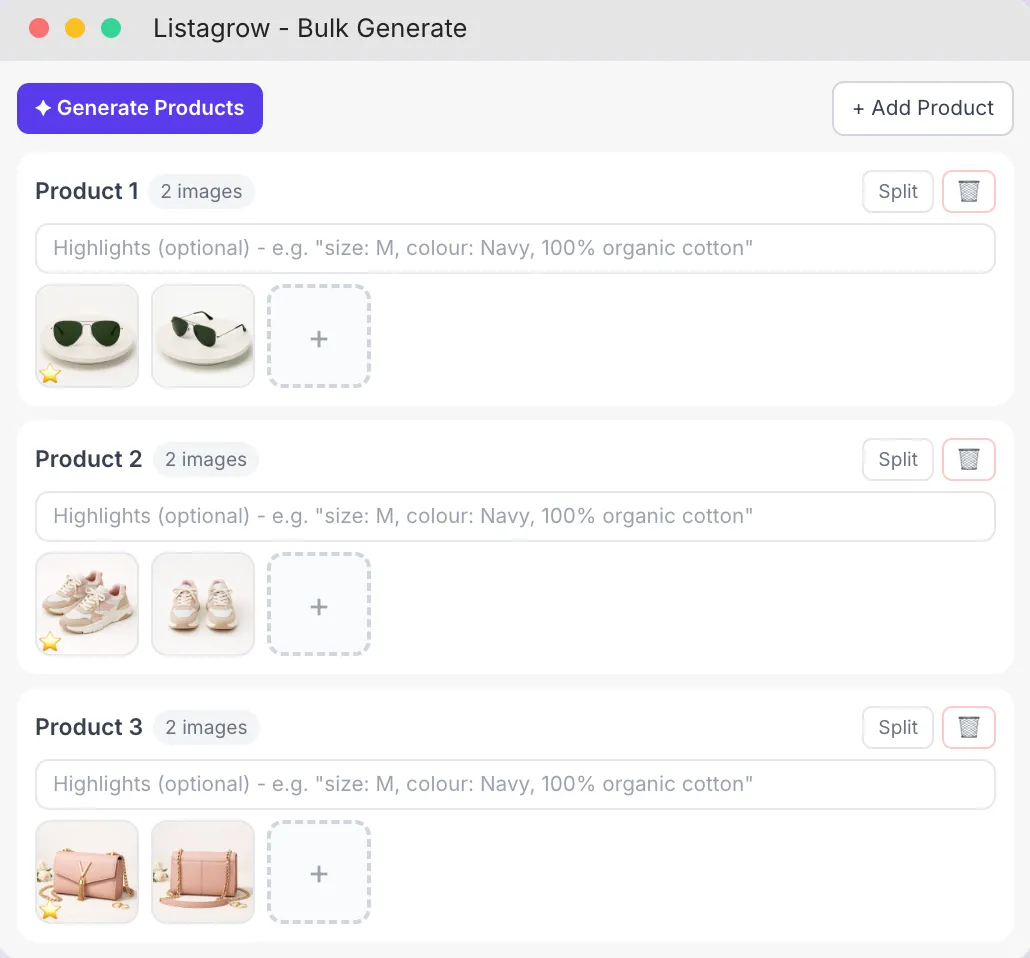
Listagrow is a Shopify bulk lister built around a different starting point: your product photos, not your text notes. Upload images inside the Shopify admin, and the AI analyses each photo to generate a full listing - title, description, tags, SEO title, meta description, and image alt text - simultaneously, for every product, running in the background while you get on with something else.
The practical difference from text-input tools: a clothing brand with 200 new seasonal SKUs can upload their photographer’s folder on Monday morning and have a fully-listed, SEO-complete catalogue ready to review by the time they’re done with their first meeting. No spreadsheets prepared in advance, no features manually entered per product.
The listing is grounded in what the AI sees in the image - colours, textures, shapes, construction details - enriched with your brand voice settings and live SEO keyword data pulled individually per product.
Strengths:
- True bulk operation: upload hundreds of images at once and generate all listings simultaneously in the background
- Generates every field, not just body copy - complete listings ready to push to Shopify in one click
- Built-in live SEO keyword research per product, not generic templates
- AI image enhancement included (background removal, studio-quality output)
- Audits your existing catalogue for incomplete listings and enriches them at scale
- Free plan available - monthly free credits included, no credit card required
Weaknesses:
- Visual-first: works best for products where imagery captures the key details. Hard specs (weight, voltage, compatibility) need to be added manually
- AI credit model: large catalogues require a paid plan
Verdict for bulk listing: The most complete shopify lister tool for merchants who need to go from raw product photos to a fully-listed catalogue. Removes most of the manual effort from both content creation and Shopify publishing.
Option 6: Manual + Freelancers or Agencies
Best for: Premium or highly technical products where bespoke copy quality is itself the differentiator
For a small number of products, outsourcing listing copy to a specialist ecommerce copywriter or agency produces richer output than any automated tool - particularly for luxury goods, high-consideration B2C purchases, or technically complex products where the nuance of the copy is part of the sales case.
The economics are straightforward. A mid-range ecommerce copywriter in the UK charges roughly £8–£20 per listing ($10–$25 USD); a specialist agency or senior writer can reach £30–£50+ per listing ($38–$63+ USD). Turnaround runs days to weeks, not hours. Above around 30–40 products, the combined cost and timeline make this impractical as a primary catalogue-building strategy - and cheap providers often produce generic copy indistinguishable from AI output at a fraction of the price.
Where it genuinely earns its cost is the top tier of a catalogue: flagship products, headline SKUs, the items where a conversion rate improvement of 1–2% pays for the copy many times over. A good copywriter brings target customer research and competitive positioning to the work, not just a description of what’s in the photo.
Verdict for bulk listing: Not a bulk solution at any realistic scale. Most useful as a complement to faster tools - use it for your best-sellers and highest-margin products, use automation for everything else.
Side-by-Side Comparison
| Native CSV | Matrixify | Shopify Magic | Text-Input AI | Listagrow | Manual/Agency | |
|---|---|---|---|---|---|---|
| True bulk mode | ✗ | Limited | ✗ | |||
| Content generation | ✗ | ✗ | Partial | Partial | ||
| Starts from images | ✗ | ✗ | ✗ | ✗ | ✗ | |
| SEO fields (all) | Pre-input only | Pre-input only | ✗ | Partial | ||
| Direct Shopify push | Varies | Manual | ||||
| Image alt text | Manual | Manual | ✗ | ✗ | Manual | |
| Complex data (metafields etc.) | ✗ | ✗ | ✗ | ✗ | ✗ | |
| Free option | Plan-limited | Some | ✗ | |||
| Cost per listing | Free | Low | Free | Low | Low–Medium | High |
Which Shopify Bulk Lister Is Right for You?
Choose native CSV import if you’re migrating from another platform, the catalogue is straightforward, and you already have complete, well-written product data ready to go.
Choose Matrixify if you’re migrating a complex catalogue from another platform - especially one with metafields, large variant structures, or data that breaks Shopify’s native importer.
Choose Shopify Magic if you have a handful of products to set up and want a quick first-draft description without installing anything - but don’t rely on it for scale.
Choose a text-input AI app if you have structured product spec sheets and just need description copy generated at moderate scale (under 100 products). Describely is the strongest option in this category.
Choose Listagrow if you’re building a new catalogue from photos, onboarding new products regularly, selling visually-driven products, or your existing Shopify catalogue is incomplete and needs enriching at scale. It’s the most complete shopify bulk lister for merchants who need the full listing - not just one field.
Choose manual/agency if you sell very few, very high-ticket items where bespoke positioning is a genuine conversion differentiator and the economics justify £8–£20+ ($10–$25+ USD) per listing.
Frequently Asked Questions
What is a Shopify bulk lister?
A Shopify bulk lister is any tool that lets you create, generate, or import multiple product listings at once - rather than adding products one at a time through the Shopify admin. The best ones handle content generation, SEO fields, image alt text, and direct publishing to your store, not just data ingestion.
What is the best Shopify lister tool in 2026?
For merchants starting from product photos, Listagrow is the most complete shopify lister tool available - it generates every listing field directly from images, with built-in SEO keyword research and one-click Shopify publishing. For complex catalogue migrations, Matrixify handles data structures that Shopify’s native importer can’t. For merchants with pre-written copy who just need descriptions generated at scale, they have multiple options available based on the size of their catalogs.
Does the best Shopify bulk lister also handle SEO?
Not all of them. Listagrow runs live SEO keyword research per product and automatically populates Shopify’s SEO title, meta description, tags, and image alt text. Most text-input AI tools and Shopify Magic cover the description field at best; SEO meta fields are either absent or require manual entry. Native CSV import and Matrixify require all SEO fields to be pre-written before import.
Can a Shopify lister tool improve my existing catalogue?
Yes - if the tool supports it. Listagrow audits your existing Shopify catalogue for incomplete products - missing descriptions, absent SEO metadata, bare titles - and can bulk-enrich them without touching listings you want to keep as-is.
Is there a free Shopify bulk lister?
Yes. Listagrow includes monthly free credits on its free plan - enough to generate and fully list several products at no cost, with no credit card required. Shopify Magic is also free and built into every Shopify admin, though it only handles one product at a time. Shopify’s native CSV import is free but doesn’t generate any content - it only moves pre-written data into your store.
Conclusion
The right tool depends on what you’re starting with. If you have clean, complete product data and need to move it into Shopify reliably, native CSV import or Matrixify will serve you well. If you have specs but need copy written at volume, Describely handles that. If the bottleneck is building a catalogue from scratch - or getting your existing one into better shape - an image-to-listing tool like Listagrow is the most practical choice, because it removes the step where you have to prepare content before you can generate it.
For most merchants building or scaling a visually-driven product catalogue in 2026, Listagrow is the most complete shopify bulk lister available. It’s the only option in this category that takes you from a photo to a fully-listed, SEO-complete Shopify product without a manual data-entry step in between.
For a deeper look at techniques for getting products into Shopify at scale, see our guide to bulk onboarding products into Shopify and the full feature breakdown of what Listagrow generates per product.