Let vendors submit from portal or mobile
Give sellers a practical path for product photos, notes and raw product data without asking your catalog team to rebuild every listing by hand.

Listagrow gives sellers a product submission path through portal and mobile workflows, then helps marketplace teams turn photos, supplier data and reused catalog records into CS-Cart-ready listings. Review seller assignment, categories, features, pricing and SEO fields, then publish approved products directly to CS-Cart.
CS-Cart Multi-Vendor marketplaces grow by adding seller products, not by asking internal teams to rewrite every listing by hand. Use Listagrow to collect product inputs, prepare native CS-Cart fields and move only approved records into the live marketplace catalog.
Give sellers a practical path for product photos, notes and raw product data without asking your catalog team to rebuild every listing by hand.
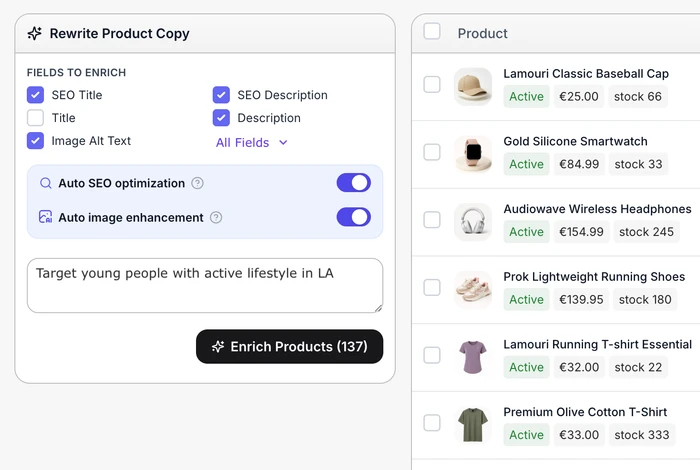
Generate product names, descriptions, Search Words, SEO fields, image context and structured details around the fields CS-Cart marketplaces need.
Keep the right vendor company, category logic, SKU handling, pricing fields and product rules attached before marketplace teams approve the listing.
Create or update products in CS-Cart after review, preserving native product fields instead of copying approved content back into the admin panel.
The integration is built around CS-Cart product data, not generic copy alone. It helps teams review the content and structured fields that decide whether a vendor product can move from submitted to approved.
The best CS-Cart Multi-Vendor marketplaces often depend on many small sellers, niche assortments and products that do not arrive as clean ecommerce records. Listagrow helps standardize those product submissions before they reach CS-Cart.
Turn phone photos, short seller notes and local assortment data into consistent product records before neighborhood inventory reaches shoppers.
Help sellers describe condition, materials, dimensions and one-off product details clearly when every item arrives with different source data.
Standardize handmade, small-batch and specialty product listings while preserving seller identity and category-specific product facts.
Prepare SKU-led and specification-heavy listings where fit, use case, stock and product attributes matter as much as the description.
Create more complete product records for professional buyers who need clear descriptions, codes, categories and structured product details.
Improve discovery and trust for marketplace catalogs built around reused, responsible, local or low-waste products.
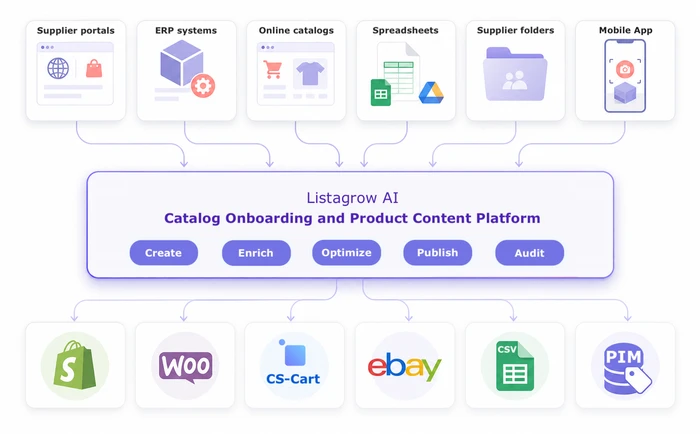
Multi-vendor catalog work is not just description writing. It needs seller assignment, category control, rules, price fields and reviewable handling for products that may already exist somewhere in the marketplace catalog.
Use the connected store category tree and vendor context so product placement stays reviewable for each seller, including vendor-limited category suggestions when store metadata supports it.
Apply merchant product rules during generate or enrich workflows, including defaults, copy rules, transformations and price adjustments where the rule configuration calls for them.
When a known catalog item should be listed for a different vendor, Listagrow can create a reviewable product record from that catalog reference and assign the selected seller before publishing.
Bring a real vendor category, a handful of product photos or a raw supplier file. We will show how Listagrow turns vendor product inputs into CS-Cart-ready records while your marketplace keeps control over review and publishing.
Yes. The CS-Cart workflow is designed around marketplace catalog operations: vendor company assignment, vendor-aware product generation, existing catalog sync, product review and direct publish back to CS-Cart.
Listagrow handles vendor catalog and product onboarding: product photos, product data, existing catalog records, generated content, review and publish. CS-Cart remains responsible for vendor account onboarding, legal/admin forms, commissions, payouts and marketplace back-office setup.
Yes. Listagrow has vendor-scoped portal and mobile access for product workflows. Vendors can submit product inputs within the connections and vendor scope assigned to them, while marketplace owners keep review and publish control.
Yes. Listagrow connects through the CS-Cart REST API with an admin email and API key, then creates or updates products after review. Publish payloads can include product content, vendor company, category IDs, product features, Search Words, SEO metadata, images for new products, price, List Price, code, stock amount and weight.
Yes. Listagrow can browse connected CS-Cart products, identify incomplete records and help improve content, SEO fields, images, categories, Search Words, product features, custom fields, price and inventory details in bulk workflows.
Listagrow uses the connected store category tree and CS-Cart vendor context during product preparation. Category suggestions can be restricted by vendor metadata, and merchant product rules can run during generation or enrichment, including rules that use vendor-aware product conditions and pricing fields.
For marketplace workflows where a known catalog item should be listed for another vendor, Listagrow can create a reviewable product record from that catalog reference and assign the selected vendor before publishing.
No. The CS-Cart workflow is designed to use categories that already exist in the connected store. This keeps product placement reviewable and avoids creating unwanted category structure during enrichment.
Yes. Listagrow can surface CS-Cart product features through platform specs and prepare feature values for review. Select-style feature values are resolved to CS-Cart variants where available, and the publisher can create missing feature variants when the workflow allows it.
Start with a few vendor products, or book a demo to discuss your CS-Cart marketplace catalog workflow.