

How to Build an AI SEO Agent with Python
Most tutorials about AI SEO agents show you a drag-and-drop workflow inside a no-code platform. You connect a few nodes, pick an LLM, and call it an agent. That works fine - up to a point.
The moment you need real first-party data, persistent memory, or something that runs autonomously every Monday morning while you’re still asleep, no-code hits a wall. Your agent becomes a workflow - a rigid pipeline that breaks the second something outside its predefined path happens.
This post is a complete walkthrough for building an open-source AI SEO agent in Python: one that uses live data from Google Search Console and GA4, calls multiple APIs in parallel, remembers what it recommended last week so it doesn’t repeat itself, and lives inside your IDE. All yours to extend.
What separates a real agent from an automation workflow
This distinction matters before we get into architecture. An automation workflow is a deterministic sequence - A triggers B triggers C. Zapier, n8n, and Make are fundamentally workflow tools, regardless of whether they have an AI node bolted on.
An agent uses an LLM as its decision-making core. You give it a goal and a set of tools. It decides which tools to call, in what order, based on what the data tells it. It can recover from unexpected results, chase down a thread it wasn’t explicitly asked to, and synthesise across multiple data sources before forming a view.
The practical difference: when you ask a workflow “what are my quick wins this week?”, it runs whatever steps you wired up. When you ask an agent the same question, it pulls GSC data, checks whether those keywords have already been acted on, looks at competitor SERP positions, checks your GA4 to see which pages have low session time, and then gives you a ranked list with justification for each item. Different league entirely.
The five-layer architecture
The agent we built for listagrow.com has five distinct layers. Each one has a single responsibility. Understanding these layers is more important than any individual line of code.
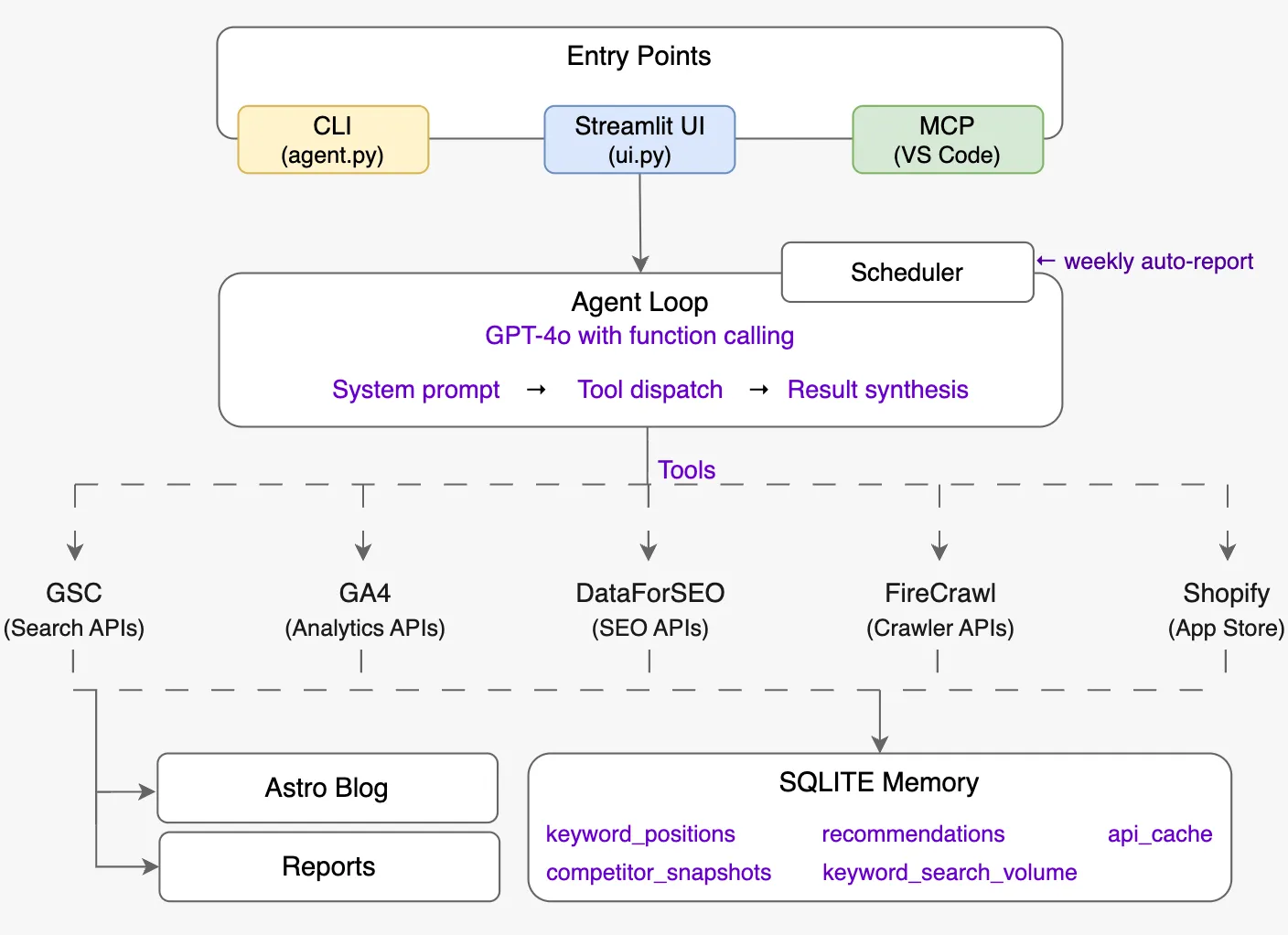
Layer 1 - Entry Points. Three ways to talk to the agent: a CLI for quick one-off queries, a Streamlit dashboard with charts and a full chat interface, and an MCP server that plugs directly into VS Code Copilot Chat. Same agent brain, three surfaces.
Layer 2 - Agent Loop. The reasoning core. GPT-4o receives your question, a detailed system prompt describing how an elite SEO strategist thinks, and a list of 40+ tool definitions. It decides which tools to call, calls them in parallel where possible, reads the results, and either calls more tools or synthesises a final answer. No rigid sequencing.
Layer 3 - Tool Layer. Five API integrations, each in its own file. They are pure functions - they take parameters, hit an API, and return clean Python dicts. The agent loop never has to know what HTTP looks like.
Layer 4 - Memory. A SQLite database that stores keyword position history, past recommendations, competitor snapshots, and a time-to-live API cache. The memory layer is what makes the agent useful over time rather than just in the moment.
Layer 5 - Outputs. A weekly Markdown report saved to reports/, and full blog posts saved directly to the Astro blog’s content folder with correct frontmatter, ready to publish.
Layer 1 in detail: the entry points
Three surfaces, one brain. All three entry points call the same run_agent() function from agent.py — the surface changes, the reasoning does not.
The CLI
The simplest surface, and the one you will reach for most during development. Run python agent.py with no arguments to start an interactive multi-turn session. Pass a question directly as an argument for single-shot mode:
python agent.py "What are my quick wins this week?"The interactive session keeps a rolling conversation history (the last 20 messages) so you can follow up naturally: “Now generate the meta description for the top three.” Single-shot mode prints the answer and exits — useful in shell scripts or cron jobs.
The CLI prints each tool call as it fires (get_ranking_opportunities(days=28)) so you can watch the agent’s reasoning process in real time. That verbosity is silenced in the other two entry points, which both set verbose=False when calling run_agent().
The Streamlit dashboard
Run streamlit run seo-agent/ui.py. This is the primary interface for non-developers and for sessions where you want charts alongside answers.
The dashboard has ten sections reachable from the sidebar: Dashboard, AI Chat, Keywords, SERP & Rankings, Backlinks, Site Audit, App Store, Content Briefs, AI Visibility, and Reports. Most sections are data-driven UIs built directly on top of the tool functions — they call keyword_research(), get_traffic_overview(), or get_all_keyword_deltas() directly without going through the agent loop.
The AI Chat page is where the full agent lives inside the dashboard. It wraps run_agent() with a st.chat_message interface, persists conversation history in st.session_state across turns, and surfaces eight quick-prompt buttons (e.g. “What are my quick win keywords this week?”, “Run a full on-page audit of my homepage”) so you can get useful answers in one click without typing.
One practical detail: the sidebar runs validate_config() on every page load and shows a green checkmark or a warning listing exactly which credentials are missing. You can start with only OPENAI_API_KEY and GOOGLE_SERVICE_ACCOUNT_JSON and the missing-credentials banner tells you precisely which tools are unavailable until you add the rest.
The MCP server
The MCP server exposes every tool as a @mcp.tool()-decorated function using the FastMCP library. The server is registered in .vscode/mcp.json so VS Code starts it automatically when you open the workspace.
The effect: all 40+ tools become available in Copilot Chat inside the editor without switching windows. The MCP server is deliberately thin — it is a registration wrapper around the identical tool functions the agent loop calls directly. There is no duplicated logic between the three entry points.
One difference from the agent loop: the MCP server does not run the agent’s reasoning loop. Each tool is called individually by the LLM client (Copilot Chat, Claude Desktop, or any MCP-compatible client) rather than orchestrated by the system prompt. This means the MCP surface is tool-by-tool rather than multi-step, but in practice the client LLM does its own multi-step reasoning across sequential tool calls — it just does not share the same system prompt or conversation history as the standalone agent.
Layer 2 in detail: the agent loop
The agent loop is the piece most developers get wrong because they over-engineer it. The entire reasoning engine is a standard OpenAI chat completion call with function calling - but with tools defined and the loop that handles tool_calls in the response.
The loop works like this:
- User question arrives as a message
- Call GPT-4o with the full conversation history and the tool definitions
- If the response contains
tool_calls→ execute those functions, append the results to the conversation as tool messages, go back to step 2 - If the response is a plain text message → that’s the final answer, return it
That’s it. The intelligence lives in the system prompt, not in orchestration code. The system prompt defines a decision framework - measure first, check memory before calling live APIs, avoid repeating recommendations, classify search intent before suggesting content, check EEAT signals on every audit. GPT-4o follows that framework every time without you writing explicit branching logic.
One design decision worth calling out: the agent uses two different GPT-4o model variants. Routine queries use gpt-4o for speed and cost. Complex analytical tasks (like generating a full weekly report or a technical site audit) route to o3-mini - a reasoning model that is significantly better at multi-step analysis but slower. Swapping the model for a task is a one-line change, which is exactly the kind of flexibility a no-code platform can’t give you.
Layer 3 in detail: the tool integrations
Each integration is designed around a single principle: the agent should never have to know what an API response looks like. Every tool function takes plain parameters, handles pagination, errors, and response parsing internally, and returns a clean, consistently-shaped dict.
Google Search Console
The GSC integration is the agent’s heartbeat. It provides the raw material for almost every SEO decision: which queries are generating impressions, which pages are ranking, which keywords are sitting at position 4–20 (the quick wins), and which pages Google can’t index.
The tool layer exposes nine distinct GSC API functions. The most important for autonomous use are get_ranking_opportunities() - which filters for keywords in striking distance - and get_non_indexed_pages(), which discovers non-indexed URLs from three sources simultaneously: the sitemap XML, the 16-month Search Analytics page history, and a manually supplied list of known legacy paths.
The URL inspection API calls are capped at 25 per run because each call consumes a quota unit. That cap is configurable in the tool definition, not hardcoded deep in a function.
Google Analytics 4
The GA4 integration provides session-level context that GSC can’t give you. GSC tells you a keyword drove 50 impressions. GA4 tells you whether the people who clicked those impressions stayed on the page or immediately bounced.
The design supports two separate GA4 properties from one agent: the main website and the Shopify App listing. The property_id parameter defaults to the website but can be overridden to query the app’s analytics in the same conversation.
DataForSEO
This is the third-party data layer that handles AI agent keyword research: keyword difficulty, search volume trends, SERP lookup, backlink analysis, competitor keyword gaps, LLM brand visibility, and more. DataForSEO is pay-per-use with no monthly fee, which matters for a self-hosted agent.
Two design decisions here: first, the agent caches every DataForSEO response for 24 hours in SQLite - the same question should not cost money twice in the same day. Second, the tool layer raises a typed DataForSEOError with the error code when a task fails, rather than returning a malformed dict that the agent has to interpret. Error handling is explicit.
Firecrawl
Web crawling for competitor content analysis. The crawl_page() function returns clean Markdown (not raw HTML), word count, H1, H2 list, and core SEO signals. The content brief generator uses this to crawl the top five SERP results for a target keyword, extract their H2 structures, find the topics that appear across all of them, and surface those as “must-cover” sections.
Firecrawl has 500 free credits per month, which is enough for a small site running weekly content briefs. The agent never crawls more than five URLs per brief, and briefs are cached for 48 hours.
Shopify App Store
The app store tools handle listing analysis, competitor search, and review summarisation. These operate by scraping the public Shopify App Store URLs since there is no official API. The agent uses this data to generate ASO-optimised listing copy and to monitor how the listing ranks for key search terms inside the app store’s own search engine.
Layer 4 in detail: persistent memory
This is the layer that turns the agent from a chatbot into something that compounds over time.
The SQLite database has five tables:
- keyword_positions - stores GSC keyword data weekly, enabling week-over-week position deltas. When you ask “which keywords improved this month?”, the agent queries this table rather than re-fetching everything from GSC.
- recommendations - every suggestion the agent makes is logged with a timestamp. Before generating new recommendations, the agent calls
get_recent_recommendations(days=30)and excludes anything it already suggested in the past month. You don’t get told to “add alt text to images” for the fourth consecutive week. - keyword_search_volumes - a local cache of volume and competition data for keywords you’ve researched before.
- competitor_snapshots - domain rank and backlink count snapshots for tracked competitors, enabling trend comparison.
- api_cache - a general-purpose TTL cache. Cache key is a string (usually
f"{function_name}:{argument}"), value is JSON, expiry is a datetime string. Any tool can read and write this cache.
The scheduler triggers a GSC snapshot every Monday before running the weekly report. This means the memory database accumulates real rank-tracking data over time - no third-party rank tracker subscription needed.
Layer 5 in detail: outputs
Two types of output. Both are Markdown files, both are ready to use immediately, both are written to disk automatically.
Weekly SEO report
generate_report() in scheduler.py produces a single Markdown file saved to reports/seo-report-YYYY-MM-DD.md. The steps inside the function, in order:
- GSC snapshot first —
_save_gsc_snapshot()fetches the last 7 days of keyword data from Google Search Console and writes it to thekeyword_positionstable. This happens before the agent runs, so the weekly delta data is fresh when the report references it. - Run the agent —
run_agent(WEEKLY_REPORT_PROMPT, verbose=True)fires the full reasoning loop withOPENAI_MODEL_DEEP(o3-mini). The prompt instructs the agent to run 10 tools in parallel and produce six structured sections. - Prepend rank movement table —
_rank_movement_table()queries the memory database for week-over-week position deltas, sorts by absolute change, and builds a compact Markdown table of up to 15 keywords — split between improving and declining. This table sits at the top of the report before the agent-generated analysis. - Write to disk — the report is assembled with a title, generation timestamp, website URL, and Shopify app URL in the header, then saved.
The six sections the agent is prompted to produce:
- 📊 Numbers — GSC clicks/impressions and GA4 sessions for the past 28 days, with week-over-week change
- ⚡ Quick Wins — keywords at position 4–20 with meaningful impressions that are one optimisation away from a higher rank
- 🎯 Keyword Targets — new keywords to pursue based on volume, difficulty, and relevance
- 🛍️ App Store Update — Shopify App Store ranking and listing analysis
- ⚠️ Watch List — pages or keywords showing declining performance that need attention
- 📅 Priority Actions — a numbered list of concrete next steps in order of expected impact
Reports accumulate in the reports/ directory with no automatic cleanup — they serve as a rolling archive of weekly SEO state.
Blog post files
generate_blog_post() in tools/copywriter.py writes a complete Markdown file to BLOG_CONTENT_DIR (configured in config.py, default: blog/src/content/blog/). The file is named {slug}.md where the slug is auto-derived from the target keyword — lowercased, spaces converted to hyphens, non-alphanumeric characters stripped.
Every file is written with Astro-compatible frontmatter:
---
title: "..."
description: "..."
pubDate: YYYY-MM-DD
author: "Your Name"
tags: ["Tag1", "Tag2"]
heroImage: ""
---
The article body uses COPYWRITER_MODEL (default gpt-4o, swappable via the COPYWRITER_MODEL env var — switch to claude-3-7-sonnet for richer long-form prose). When no brief argument is supplied, the function calls generate_content_brief() automatically, so a single invocation handles the full pipeline from raw keyword to publish-ready file.
The content pipeline: keyword → published post
One of the most useful end-to-end capabilities is the automated content pipeline. It works in five steps, all triggered by a single function call:
- SERP analysis -
generate_content_brief()calls DataForSEO for keyword difficulty and search volume, then fetches the live top-10 SERP results. - Competitor crawl - the top five ranking URLs are crawled with Firecrawl. Their H1, H2 structure, and word count are extracted.
- Must-cover extraction - H2 headings that appear across multiple top-ranking pages are identified as topics the post must address to be competitive. This is the signal most manual content briefs miss.
- Brief assembly - keyword difficulty, recommended word count (median competitor word count × 1.2), secondary keywords, and the must-cover topic list are packaged into a brief dict.
- Post generation - the copywriter uses the brief as its primary context. The model receives the SERP landscape, must-cover topics, secondary keywords, and a strict set of SEO rules. The output is complete Markdown with Astro frontmatter, saved directly to
blog/src/content/blog/{slug}.md.
The copywriter model is configurable independently from the agent model. We default both to gpt-4o but swap the copywriter to claude-3-7-sonnet for longer-form posts - Claude tends to produce better prose at 3,000+ words while GPT-4o’s function-calling remains more reliable for the analytical agent work.
The keyword research, competitor crawls, and content brief that informed this post were generated by running exactly this pipeline. The SERP analysis surfaced the four competitors covered earlier; the difficulty checks shaped the keyword strategy. The prose was written by hand from that research - which is the right division of labour.
The scheduler: truly autonomous SEO
The scheduler is what turns this from a chatbot into a genuinely autonomous SEO agent. It is also the simplest component in the entire SEO automation stack - the schedule library, a single function, every Monday at 08:00 local time.
That function does three things in order: saves the current week’s GSC keyword data to the memory database, runs the full agent against a 600-word weekly report prompt, and saves the result as a timestamped Markdown file in reports/.
The weekly report prompt instructs the agent to call ten specific tools in parallel, then synthesise the results into six sections: this week’s numbers, top three quick wins, two or three new keyword targets, an app store update, a watch list, and priority actions for the next seven days. Every recommendation in the report is automatically logged to the recommendations table so the following week’s report won’t repeat them.
Running python scheduler.py now triggers the report immediately - useful for the first run and for testing configuration changes.
What the system prompt is doing
The system prompt is doing most of the intellectual work. It is not a short prompt. It defines a decision framework with explicit ordering: measure before recommending, check memory before calling live APIs, check prior recommendations before suggesting anything, classify every keyword by search intent before touching content, apply a feasibility filter based on difficulty score, prioritise quick wins over new content creation.
It also defines precise technical SEO rules that the agent applies consistently: title tag format and character limit, meta description length and keyword placement, H1 rules, internal linking requirements, Core Web Vitals thresholds with exact numbers, App Store ranking factors with specific character limits.
This is the part that takes the most iteration. The initial version had no framework - just “you are an SEO expert, be helpful.” The responses were generic and inconsistent. Adding the decision framework and the strict output format (always data first, always exact values, never say “consider”) transformed the quality of responses more than any model upgrade did.
Credentials and setup
To build an AI SEO agent with this architecture, you need five sets of credentials:
- OpenAI API key - for the agent reasoning and copywriter
- Google Service Account JSON - a single service account that gets Viewer access to both GSC and GA4
- DataForSEO login + password - pay-per-use, no subscription; set a spending limit in the dashboard
- Firecrawl API key - 500 free credits per month is sufficient for most small sites
All credentials go in a .env file in the seo-agent/ directory. The config module loads them once at startup. There is a validate_config() function that checks which credentials are present and tells you exactly which tools will be unavailable if any are missing - so you can start with just GSC and OpenAI and add the others later.
The full project - agent.py, mcp_server.py, memory.py, scheduler.py, ui.py, and all tool integrations - is open-source on GitHub: SimplerSoftwareIO/seo-ai-agent. The .env.example in the repo documents every variable with the correct source URL.
What this agent does that no SaaS tool does
Comparing this against commercial SEO platforms is useful for understanding the design choices:
Persistence beats real-time. Semrush and Ahrefs show you a snapshot. This agent shows you movement - because it has been tracking your keyword positions weekly and can tell you exactly which terms improved and by how much since you published that last article.
Memory beats repetition. No commercial tool knows what it recommended to you last month. This agent does, and won’t repeat itself.
IDE integration has no equivalent. The MCP server puts live SEO data inside your code editor. There is no commercial tool that works this way.
Full pipeline ownership. The content brief → post generation → Astro file-write pipeline is a complete publishing workflow that you own. The output is Markdown in your own repo, not locked in a third-party CMS.
Total cost. At moderate usage, the API costs run to roughly $5–15 per month - mostly DataForSEO and OpenAI. The weekly report costs around $0.10 in API credits.
What to build next
The architecture described here deliberately stops short of taking autonomous action on your site. The agent recommends - a human publishes. That is the right default.
The natural next steps are:
- Auto-publishing - extend the scheduler to push approved posts to your CMS via API when a human marks them ready
- Rank alerting - add a condition to the weekly report that sends a Slack or email alert when a tracked keyword drops more than three positions
- Competitor monitoring - schedule daily competitor snapshots to the memory database and alert when a competitor significantly increases their backlink count or starts ranking for your target keywords
- Internal link graph - the
analyse_internal_links()tool already crawls your site graph; a weekly report section that flags new pages with fewer than three inbound links would catch every orphaned post automatically
The foundation is solid because it was designed with extension in mind. Adding a new tool is a matter of writing a pure function, registering it in the agent’s tool list, and optionally exposing it through the MCP server. The memory, the scheduler, and the reasoning loop all stay the same.
Fork the project and start extending: github.com/SimplerSoftwareIO/seo-ai-agent.
Frequently asked questions
What is an AI SEO agent? An AI SEO agent is a program that uses a large language model as its reasoning core, connected to live data sources like Google Search Console, keyword APIs, and web crawlers. Unlike a workflow - which follows a fixed, pre-wired sequence - an agent decides which tools to call and in what order based on your goal. You ask a question; it figures out what to measure. The open-source implementation described in this post is available at github.com/SimplerSoftwareIO/seo-ai-agent.
What APIs do you need to build an AI SEO agent? At minimum: an LLM API (OpenAI GPT-4o is the most reliable for function calling) and the Google Search Console API for real search data. A fully-featured agent also needs Google Analytics 4 for session context, a keyword data provider like DataForSEO for difficulty and volume, and a web crawler like Firecrawl for competitor content analysis. Those five are exactly what the implementation above uses.
How much does it cost to run this agent? At moderate usage - one automated weekly report and a handful of on-demand queries - expect roughly $5–15 per month in API costs. The weekly report costs approximately $0.10 in LLM credits. GSC and GA4 are free. DataForSEO and Firecrawl both offer generous free tiers or very low pay-per-use pricing for small sites.
What is the difference between this and a tool like Semrush or Ahrefs? Commercial SEO platforms are optimised for breadth - snapshots across millions of domains with a polished UI. A self-hosted agent is optimised for depth on your specific site: it knows your position history, remembers what it recommended last month, and can be queried in natural language from inside your IDE. They are complementary, not competing.
Does this agent work without coding experience?
The setup requires Python and API credential configuration. Once running, the Streamlit dashboard provides a no-code interface for queries and reports. But initial deployment is not a one-click install - it is aimed at developers or technical SEOs comfortable with a .env file and a terminal.
Are you running an online store or managing ecommerce products? ListaGrow generates SEO-optimised product listings across Shopify, Amazon, Etsy, and more - same AI intelligence, zero engineering overhead. If AI-generated content quality is a concern, read Top Problems With AI Product Descriptions (And How to Fix Them) - it covers exactly what to watch out for. Start free →